Why Android 14 and newer resist identity edits: Verified Boot, RPMB and the secure world
Anyone doing repair work has noticed the shift. On an older device, identity and calibration data sat in storage the running system could reach. On a phone shipping with Android 14 or 15, the same operations fail, tools that used to work return nothing, and the device often refuses to boot afterwards.
This is not a bug or a missing tool. It is the intended outcome of about a decade of deliberate work, and understanding the mechanism explains a great deal about what is and is not possible on modern hardware.
What this article is. An explanation of the security architecture and what it means for legitimate repair. It contains no bypass instructions, and reprogramming a device to carry an IMEI that was not its own remains illegal regardless of how difficult or easy it is technically.
The chain of trust
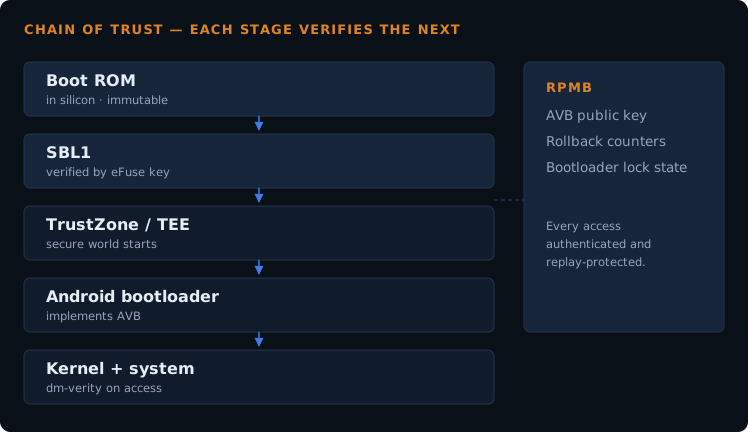
A modern Android device does not simply boot. Each stage verifies the next before handing over control.
The first stage lives in ROM inside the chip itself and cannot be modified. It verifies the next bootloader stage using a public key stored in eFuses — one-time-programmable hardware. That stage verifies the one after it, and so on up to the Android bootloader, which implements Android Verified Boot.
AVB then verifies the boot image and the hash trees covering system and vendor partitions. Verified Boot has been mandatory since Android Nougat, with exemptions removed entirely from Android 9 onward. dm-verity checks blocks on access, so modifications are detected not just at boot but continuously during use.
The practical consequence: you cannot quietly modify a partition and have the device carry on as if nothing happened. Verification is not a startup formality that runs once and forgets.
RPMB: storage that refuses unauthorised writes
This is the piece most repair people have not encountered before, and it is central to why identity data resists editing.
RPMB — Replay Protected Memory Block — is a separate physical partition inside the eMMC or UFS chip. Every access to it is authenticated, so data can be stored and retrieved in a way that is both authenticated and replay-protected. An authentication key has to be programmed before RPMB can be accessed at all.
What lives there includes rollback counters, the bootloader lock state, and the AVB public key. The secure OS in TrustZone reads the AVB key from RPMB and uses it to verify the vbmeta image before the kernel is allowed to run.
Replay protection is the clever part. On ordinary storage, an attacker can record the bytes of a valid state and write them back later. RPMB's authenticated counters make that impossible — a previously valid write cannot simply be replayed.
The secure world
ARM devices run two operating systems side by side. The normal world runs Android. A separate secure OS runs in TrustZone, and the normal world cannot access the memory or resources of the secure world.
This is where key handling, attestation and secure storage access live. It means that even a fully compromised Android kernel does not automatically get access to the material held in the secure world — which is exactly the design goal.
Each device also carries a unique key burnt into immutable memory during manufacturing, which in principle cannot be read out or altered by any other component.
Why this hits repair work specifically
| What changed | Effect on repair |
|---|---|
| Verified Boot enforced | Modified partitions are detected. The device enters an error state rather than booting with altered contents. |
| Rollback protection | You cannot flash an older, more permissive firmware to get access. The counters in RPMB prevent it. |
| Identity data behind the TEE | Operations that used to run from the normal world now require authorisation the normal world does not have. |
| Boot state in attestation | Verified Boot state is included in key attestation, so apps and backend services can check it. Banking and payment apps commonly do. |
| Locked bootloaders by default | Unlocking, where permitted at all, wipes the device and is visible in attestation afterwards. |
Notice that none of these were designed to obstruct repair. They exist to stop a stolen phone being repurposed, to stop malware surviving a factory reset, and to stop attackers downgrading to a vulnerable firmware. Repair difficulty is a side effect of goals most people would agree with.
What still works, and what does not
Being clear about this saves a lot of wasted effort.
Still workable on modern devices:
- Flashing official signed firmware — this is verified and passes
- Restoring your own backup, where the device and its bootloader state permit it
- Hardware repair — screens, batteries, connectors, board-level work
- Recovery from a failed flash using the manufacturer's own tools and packages
Not workable outside authorised channels:
- Writing identity data the device did not originally hold
- Downgrading past a rollback counter
- Running modified system images with the bootloader locked
When something falls in the second list, the honest answer to a customer is that it needs the manufacturer's authorised service channel, which has the signing keys and provisioning tools that make the operation legitimate. Tools claiming otherwise are usually exploiting a vulnerability, and those close with each security patch — which is why they work on one model and firmware version and not the next.
For repair as a business, this is worth planning around rather than fighting. The work that remains viable on modern devices is hardware repair, data recovery, official firmware flashing, and diagnosis — and older Qualcomm and MediaTek devices, which are still everywhere, remain far more open.
Frequently asked questions
- Is it impossible, or just hard?
- For anyone without the manufacturer's signing keys, treat it as impossible. Published attacks against RPMB and similar mechanisms exist in research, but they involve specialist equipment and target specific implementations — they are not a repair workflow.
- Why do some tools still claim to do it on Android 14?
- They usually depend on an unpatched vulnerability in a specific chipset and firmware version. That is why they work on one model and fail on the next, and why they stop working after an update.
- Does unlocking the bootloader help?
- It allows unsigned code to run, but it wipes the device and is recorded in attestation. It does not grant access to secure-world storage.
- Will this get stricter?
- The trend has been one direction for a decade. Each release has tightened verification and moved more material behind hardware-backed protection.
- What about older devices?
- Much more open, which is why most guides on this site cover older Qualcomm hardware. The TB-8703N is recoverable through EDL precisely because it predates most of this.
Not sure whether a device you are working on falls inside or outside these protections? Send me the model and Android version. Chipset and release together usually answer it.