IMEI shows null after a flash: where it went and what restores it
You flash a ROM, the device boots, and there is no signal. Dial *#06# and you get nothing, zeros, or 000000000000000. Settings shows IMEI as unknown or unavailable.
This is one of the more alarming things that can happen after a flash, because unlike a bootloop it does not look fixable — the number seems simply gone. Usually it is not gone. It is unreadable, which is a different problem with a different solution.
Scope of this guide. This covers restoring your own device's original IMEI from its own backup or its own storage. Writing a different IMEI onto a device is illegal in Pakistan and most other countries, and it is not covered here. The companion article on IMEI patching explains why that matters more than people realise.
Where IMEI actually lives
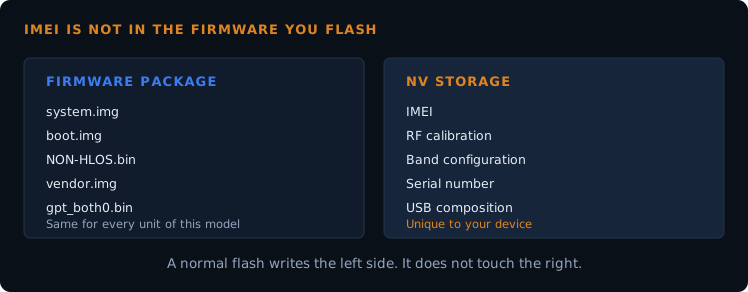
The most useful thing to understand here: IMEI is not in the firmware you flashed. Download a stock package, open it up, and the number is nowhere inside. Every unit of that model ships with the same package and a different IMEI.
It lives in NV storage — a small area written at the factory, holding values specific to your individual device. Alongside IMEI you will find RF calibration, band configuration, serial numbers, and the USB composition setting. On Qualcomm devices this region is what a QCN backup captures. On many Android devices the equivalent partitions are called EFS or modemst.
This is why the problem is recoverable in principle. A normal firmware flash writes partition images; it does not target NV. So when IMEI disappears after a flash, the number usually still exists — something else broke.
Four reasons IMEI reads as null
| Cause | What is actually happening |
|---|---|
| Modem firmware mismatch | NON-HLOS.bin from the wrong build or variant. NV is intact but the modem cannot parse it correctly. Very common, and the easiest to fix. |
| EFS or modemst wiped | A wipe that included these partitions, or a tool that formatted more than expected. The data is genuinely gone unless you have a backup. |
| NV corruption | An interrupted write left the region inconsistent. Present but unreadable. |
| A failed QCN restore | Restoring a QCN that did not match the device. This is also what can leave a router stuck in DIAG mode. |
Working through it
1. Confirm the number physically
Before anything else, find what your IMEI actually is. It is printed under the back cover, on the SIM tray, on the original box, or on the purchase receipt. Write it down. You cannot verify a successful restore without knowing the target.
2. Try the modem firmware first
If NV is intact and only the modem build is wrong, reflashing the correct NON-HLOS.bin for your exact model often brings the number straight back. This is the lowest-risk step available and it costs one partition write, so it is worth doing before anything more invasive.
Getting the right file means matching your exact variant — see why the modem image is one of the genuinely variant-specific parts of a firmware package.
3. Restore your own QCN or EFS backup
If you took a backup before flashing — as the pre-flash backup guide recommends — this is the moment it pays for itself. Restoring your own QCN through QPST puts back your own original NV data, including your own IMEI.
This is the clean fix. It is also the only fix that is unambiguously legitimate, because the number being written is the one that belonged to the device in the first place.
4. If you have no backup
Here I have to be straight with you rather than pretend there is a trick.
If EFS or NV is genuinely wiped and you have no backup of your own, there is no legitimate home procedure that restores the original number. The tools that claim to are writing an IMEI rather than recovering one, and that is the illegal path regardless of whether the number you type matches the sticker on the back.
On newer hardware this is not a matter of finding a better tool — Android 14 and later put identity data behind hardware-backed protection that the running system cannot reach. The legitimate routes at that point are the manufacturer's authorised service centre, which can restore factory data for your device, or accepting the device as Wi-Fi only. Neither is satisfying, and I would rather tell you that than send you to a tool that creates a legal problem on top of a technical one.
Checking the result
After any fix, verify properly:
- Dial
*#06#and compare against the number printed on the device - Check both slots on a dual-SIM device — one can restore while the other does not
- Insert a SIM and confirm the device actually registers on the network
- In Pakistan, confirm status with PTA by sending the IMEI to 8484
A device that shows the right number in Settings but never registers on a network has not really been fixed — the modem is still not reading NV correctly.
Frequently asked questions
- Does flashing a ROM erase IMEI?
- Not normally. IMEI lives in NV storage, which standard firmware images do not target. Losing it usually means a wipe went further than intended or the modem firmware does not match.
- Is it legal to restore my own IMEI?
- Restoring your own device's original number from its own backup is a repair. Writing a different number, or reprogramming a device to carry a number that was never its own, is what the law prohibits.
- Can I use a QCN from another phone of the same model?
- Technically it may get the modem working. Legally you are then operating on someone else's IMEI, which is exactly what regulators are looking for — and their RF calibration will not match your hardware either.
- My IMEI shows correctly but there is still no signal.
- Then IMEI was probably never the problem. Look at the modem firmware, band configuration, and antenna connections instead.
- What if only one SIM slot lost its IMEI?
- That points to partial NV damage rather than a wipe. Reflashing the correct modem firmware is the first thing to try.
Lost signal after a flash and not sure which of the four causes you are looking at? Tell me your model and what *#06# returns. Null, zeros, or a wrong number each point somewhere different.