What to back up before you flash anything
Every guide on this site exists because something went wrong. The pattern I keep noticing, looking back at all of them, is how much time could have been saved by five minutes of preparation before the first flash.
This is the article I wish I had read first. Not a recovery guide — a list of what to capture while your device still works, so that a bad flash becomes a setback instead of a research project.
Why backups on Android are confusing
People assume "back up my phone" means their photos and messages. For flashing work, that is the least important layer. The things that actually make a device unrecoverable are lower down and invisible to normal backup tools.
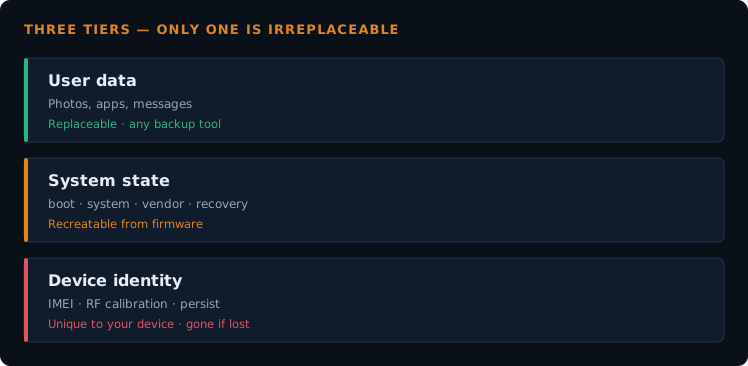
There are roughly three tiers, and they need completely different tools:
| Tier | What it is |
|---|---|
| User data | Photos, apps, messages. Replaceable, and every normal backup tool handles it. |
| System state | Partition images — boot, system, vendor, recovery. TWRP backs these up. Recreatable from firmware if you can find the right package. |
| Device identity | IMEI, RF calibration, sensor calibration, serial numbers. Unique to your device. Not in any firmware package. Effectively irreplaceable. |
That third tier is the one worth being careful about, because no amount of downloading gets it back.
What to capture, in priority order
1. The partition table
With the device in EDL, dump the GPT with printgpt and save the output to a file. It costs nothing and it is the single most useful reference you can have.
It tells you exactly what your device's layout looks like — which lets you verify whether any firmware package you find later actually matches, rather than guessing. The method is in the EDL connection guide.
2. The NV / QCN data
This is where IMEI and RF calibration live. QPST can read a QCN backup from a working device, and that file is specific to your hardware.
Restoring someone else's QCN gets a device booting and leaves you running on another device's identity — which is a legal problem in most countries and a performance problem everywhere. It is also how a device ends up stuck in DIAG mode when the restore goes wrong. Your own backup avoids all of that.
3. The persist partition
Sensor calibration, and on many devices fingerprint and camera calibration too. Wipe it and you get symptoms that look nothing like a flashing problem — auto-rotate stopping, proximity sensor failing during calls, a camera that focuses badly.
People chase these as hardware faults for weeks. TWRP can back up persist on most devices; do it.
4. A full TWRP backup
Boot, system, vendor, and data if you have space. This is your fastest route back if a ROM turns out to be broken. Store it off the device — internal storage does not survive a data format.
5. The stock firmware package
Download it while your device works and you have time to verify it is the right one. Hunting for firmware while your only device is dead, on a phone borrowed from someone else, is a genuinely miserable experience. I have done it.
Store backups somewhere other than the device. A backup on internal storage disappears the moment you format data. External SD, USB OTG, or copied to a PC — anywhere but the device you are about to modify.
What backups do not protect you from
Worth being straight about the limits, because a backup can create false confidence.
- A damaged bootloader chain. If the device cannot boot far enough to reach recovery, a TWRP backup is unreachable. You need EDL and a firmware package at that point.
- Hardware failure. Failing eMMC does not care what you saved.
- A backup you never verified. An incomplete or corrupt backup file discovered at the moment you need it is worse than knowing you had none.
Which is why the partition table dump and the firmware package matter as much as the backups themselves. Those are what get you out of the situations where recovery-based backups cannot reach you.
A realistic five-minute checklist
- Dump and save the GPT with
printgpt - Read a QCN backup with QPST if the device has a modem
- Back up persist in TWRP
- Back up boot, system and vendor in TWRP
- Copy all of it off the device
- Download the stock firmware for your exact model and keep it
None of this is exciting and all of it is faster than the alternative. The weeks I spent on a bricked tablet started with a flash where none of the above had been done.
Frequently asked questions
- Is a Google account backup enough?
- For photos and app data, largely yes. For anything that matters when a flash fails, no — it covers none of the lower tiers.
- Can I back up IMEI without a PC?
- Reading NV data properly needs QPST or an equivalent tool over a diagnostic port, so realistically you need a PC.
- My device is already bricked. Is it too late?
- For TWRP backups, yes. But if the device still enters EDL you can often still dump the partition table and read NV data from it, which is worth doing before you flash anything over the top.
- How much space do I need?
- A full TWRP backup including data can run to several gigabytes. The critical items — GPT dump, QCN, persist — are tiny by comparison. If space is tight, take those.
- Should I back up before every flash, or just the first?
- The identity-tier items only need capturing once, since they do not change. Re-take the system backup whenever you have a working configuration worth returning to.
Not sure what your device needs backed up? Send me the model number. Which partitions matter varies by chipset, and it is worth checking before rather than after.