Is your device actually bricked? How to tell which mode it is really in
Most devices people describe as bricked are not bricked. They are running, they are responding, and they are sitting in a mode the owner does not recognise — usually because the screen is black and nothing obvious happens when you press the power button.
This matters because the word decides what you do next. If you believe the device is dead, you stop. If you know it is in EDL mode waiting for a firmware load, you have a clear path forward. I have spent weeks on devices that turned out to be perfectly recoverable, and the delay was never the hardware — it was not knowing what I was looking at.
The one test that tells you the most
Forget the screen. Plug the device into a computer and look at what appears there.
On Windows, open Device Manager. On Linux, run lsusb. A device that shows up in that list is powered, running code, and negotiating with your PC. That is not what a dead device does.
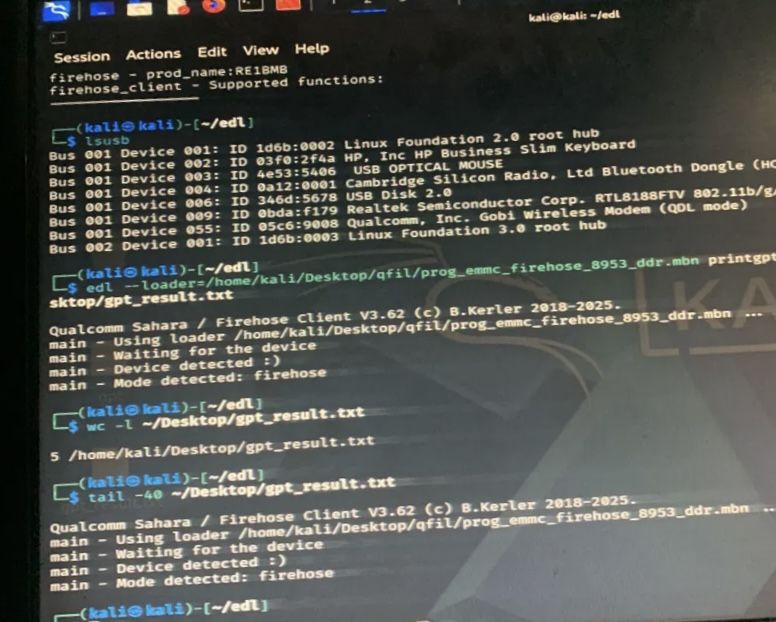
05c6:9008 Qualcomm, Inc. Gobi Wireless Modem (QDL mode). Nothing on screen, fully alive.This single check splits your problem cleanly in half. Enumerates means software problem, and software problems are recoverable. Nothing at all, on any cable, on any port, on any machine — now you are looking at a possible hardware fault.
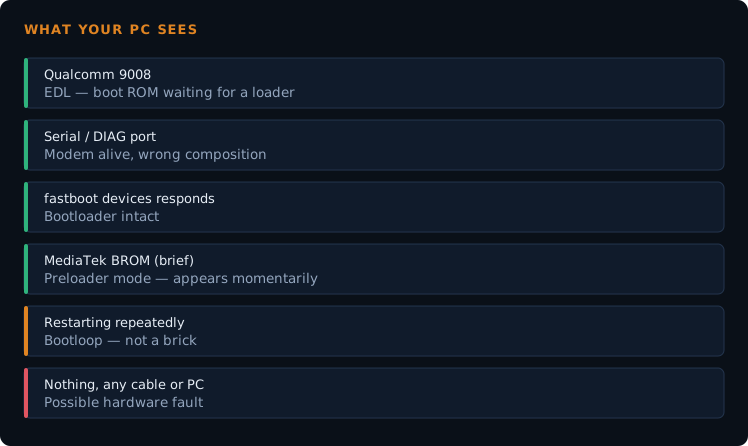
What each mode looks like
Here is what you are likely to see and what it means.
| What your PC shows | Mode | What it means |
|---|---|---|
| Qualcomm HS-USB QDLoader 9008 | EDL (Emergency Download) | The boot ROM is running and waiting for a firmware loader. This is the deepest recovery mode on Qualcomm hardware and it survives almost any partition damage. Screen stays black. |
| Qualcomm HS-USB 900E | Diagnostic / Sahara sub-mode | A related diagnostic composition. Often means drivers are partly working but the device has not fully entered the 9008 state. |
| A serial or diagnostic COM port on a router or modem | DIAG | The modem is running but presenting its engineering interface instead of a network device. Common after a bad QCN restore. No Wi-Fi, no web UI. |
Android Bootloader / fastboot devices responds |
Fastboot / bootloader | The bootloader is intact and accepting commands. This is a good position to be in — you can usually flash your way out directly. |
| MediaTek Preloader or BROM port that appears for a second | MediaTek preloader / BROM | MediaTek's equivalent of EDL. The port often appears only briefly when you connect, which is why people miss it entirely. |
| Samsung Download mode / Odin sees the device | Download mode | Samsung's flashing mode. Usually has a visible screen, so this one rarely gets mistaken for a brick. |
| Device shows as a normal Android device but keeps restarting | Bootloop | Not a brick at all. The system partition is loading and failing. Recovery and fastboot are usually still reachable. |
| Nothing appears, on any port or cable or machine | Possibly a hardware fault | Now the word brick may be accurate. Check charging, try a known-good cable, and try the button combinations below before concluding this. |
Before you conclude the device is dead
Four things regularly produce a false "nothing detected", and all four are worth ruling out first.
- The cable. Charge-only USB cables are extremely common and carry no data lines. A device on a charge-only cable will never enumerate no matter what mode it is in. Test your cable with a working phone first.
- The port. USB 3.0 ports are unreliable for EDL and flashing work. Use a USB 2.0 port, directly on the machine, not through a hub.
- The drivers. On Windows, a device in EDL with missing drivers shows as an unknown device or nothing useful at all. Install the Qualcomm 9008 drivers before you decide the device is silent — there is a full guide to getting a stable 9008 connection covering drivers on both Windows and Linux.
- The button combination. Many devices only enter EDL when you hold the right buttons while connecting. Volume up and down together while plugging in the cable works on a lot of hardware. Some need volume up alone. Xiaomi devices generally want volume down plus power.
If Windows keeps failing to see a device you are confident is alive, try a Linux live USB. Linux has no driver signing complications, and I have had devices that Windows refused to talk to enumerate immediately on Kali. This is covered in detail in the TB-8703N hard brick guide.
Hard brick and soft brick are not useful terms
People use these words to mean very different things, which is why forum threads about them go nowhere.
What actually matters is a single question: which layer is broken, and which layer below it still works? A device is a stack. The boot ROM sits at the bottom, burned into the chip and effectively impossible to damage with software. Above it sit the bootloader, the recovery, the system, and finally your apps and data.
A failed flash usually damages something in the middle of that stack. Everything below the damage still runs — which is exactly why a tablet with corrupted partitions still answers on a 9008 port. The boot ROM does not care that the partitions above it are ruined.
So the practical version of the question is not "is it bricked". It is "how far down the stack do I have to go to find something that still works?" Then you flash upward from there.
Where to go from each mode
- Qualcomm 9008 / EDL — you need a firehose programmer and a firmware package for your exact model. See the hard brick recovery walkthrough, including why Sahara errors are a connection problem rather than a firmware problem.
- Router or modem in DIAG — the device is waiting for a command, not a reflash. See the MBB router guide.
- Fastboot — the most comfortable place to be stuck. You can flash individual partitions without opening EDL at all.
- Bootloop with recovery reachable — often a partition or filesystem problem rather than a bad ROM. TWRP can repair filesystems, as covered in the LineageOS install guide.
- Nothing is broken yet — the best time to read what to back up before you flash is now, not after.
- Boots normally but something is broken — not a brick at all. Missing audio, missing sensors and similar faults are usually configuration, like the mic problem I traced through the audio HAL.
Frequently asked questions
- My phone is completely black and does not vibrate. Is it dead?
- Not necessarily. A device in EDL mode shows nothing on screen and gives no feedback at all. Plug it into a PC and check Device Manager before concluding anything.
- Can a software flash permanently destroy a phone?
- It is much harder than people assume. The boot ROM is burned into the chip and a normal flash cannot touch it. Damage is usually recoverable as long as the device still enters its emergency mode.
- My PC detects the device for a second and then it disappears.
- Two common causes: a device dropping off mid-handshake, which usually points to cable, port or drivers, or a MediaTek device whose BROM port only appears briefly by design. Which one it is depends on the chipset.
- Does a dead battery look like a brick?
- It can. A deeply discharged device may show nothing for a long time on a charger. Leave it connected for a few hours before you start diagnosing anything else.
- Is there any state that is genuinely unrecoverable at home?
- Yes — damaged eMMC storage, a power management fault, or physical damage. The clue is that the device never enumerates under any condition, on any machine. That is a hardware repair, not a flashing job.
Not sure which mode yours is in? Send me the model number and exactly what your PC shows in Device Manager. Those two details are usually enough to identify it.